Biggest Xbox Series S Buying Mistakes (And How to Avoid Them)
The Xbox Series S occupies a unique position in the modern gaming landscape. As the more affordable sibling to the powerhouse Xbox Series X, it was designed to provide a gateway into the current generation of gaming without the high entry cost. For many, it is the perfect secondary console, a dedicated Game Pass machine, or a budget-friendly way to play the latest releases. However, because it makes specific hardware compromises to achieve its lower price point, it is also one of the easiest electronics purchases to get wrong. Many consumers approach the Series S with expectations based on traditional console cycles, only to find that their specific gaming habits clash with the machine’s design. Avoiding the biggest Xbox Series S buying mistakes requires a deep understanding of digital ecosystems, storage management, and display technology.
Detailed Product Analysis: The Little Console That Could
To understand the potential pitfalls of buying an Xbox Series S, one must first analyze what the hardware actually is—and what it isn't. The Series S is a digital-only console that targets a resolution of 1440p at up to 120 frames per second, though in practice, many modern, demanding titles run at 1080p. It shares the same high-speed NVMe SSD architecture and Vellore CPU architecture as the Series X, ensuring that load times and menu responsiveness are nearly identical across both machines. This is the console’s greatest strength: it feels like a next-gen machine in every interaction, even if the visual output is scaled back.
The primary engineering trade-off is the GPU. While the Series X boasts 12 teraflops of computing power, the Series S has 4 teraflops. This discrepancy means that while the Series S can run the same games as its larger counterpart, it does so with reduced texture quality, lower draw distances, and often a lack of ray-tracing features. Furthermore, the memory pool is smaller and slower, which can lead to developers capping frame rates or reducing the density of in-game environments. For a casual gamer or someone moving up from an original Xbox One or PlayStation 4, the leap in performance is still massive. For a tech enthusiast with a 4K OLED television, the limitations become much more apparent.
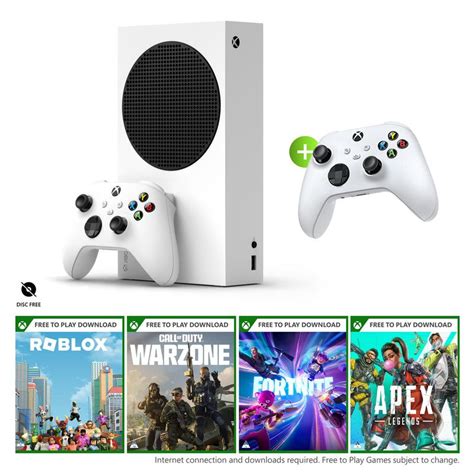
The most significant point of friction for new owners is the "all-digital" nature of the console. There is no disc drive. This is not just a minor inconvenience; it represents a total shift in how a user owns and interacts with media. You cannot borrow a game from a friend, you cannot buy a used copy at a local shop, and you cannot use the console as a 4K Blu-ray player. Every byte of data must be downloaded, which places a heavy premium on both the internal storage space and the quality of the user’s home internet connection.
Common Pitfalls and Real-World Use Cases
One of the most frequent mistakes is purchasing the Series S for a household that primarily buys physical games. If a parent buys this console for a child who has a shelf full of Xbox One discs, those discs become useless coasters. Another mistake involves the "hidden cost" of storage. The base model originally launched with a 512GB SSD, but after accounting for the system software, users are left with roughly 364GB of usable space. With modern titles like Call of Duty or Halo Infinite exceeding 100GB, the drive can fill up after only three or four major installations. To expand this storage while maintaining the ability to play "Series S|X Optimized" games, users must buy proprietary expansion cards, which can often cost nearly as much as the console itself, effectively nullifying the "budget" appeal.
Shop the latest Electronics picks on Amazon.
Browse Now →Pros and Cons of the Xbox Series S
- Pro: Exceptional Value for Entry-Level Gaming. It remains the most affordable way to access current-gen exclusive titles and the vast Xbox Game Pass library without spending five hundred dollars.
- Pro: Compact and Portable Design. The Series S is incredibly small, making it the ideal choice for dorm rooms, small apartments, or for travelers who want to pack their gaming setup in a backpack.
- Pro: Fast Loading and Quick Resume. The NVMe SSD ensures games load in seconds, and the Quick Resume feature allows users to switch between multiple active games instantly, right where they left off.
- Pro: Stealthily Quiet Operation. Even under heavy load during intensive gaming sessions, the Series S fan is nearly silent, which is a major upgrade over the loud "jet engine" fans found in older consoles.
- Con: Limited Internal Storage. The 512GB model is insufficient for the modern era of "live service" games, forcing users to constantly delete and reinstall titles.
- Con: No Physical Media Support. The lack of a disc drive prevents the use of used games, physical collections, or Blu-ray movies, locking the user into the Microsoft Store ecosystem.
- Con: Not Truly 4K-Capable. While the console can upscale to 4K, it lacks the native rendering power to provide a crisp image on large-screen ultra-high-definition displays, often resulting in a softer visual presentation.
- Con: Smaller Memory Pool. With only 10GB of RAM compared to 16GB in the Series X, some games suffer from lower frame rates or lack "performance modes" that are standard on higher-end hardware.
Technical Comparison: Series S vs. Series X
| Feature | Xbox Series S | Xbox Series X |
|---|---|---|
| Target Resolution | 1440p (Upscaled 4K) | Native 4K |
| Disc Drive | None (Digital Only) | 4K UHD Blu-ray Drive |
| Internal Storage | 512GB or 1TB SSD | 1TB SSD |
| GPU Power | 4 Teraflops | 12 Teraflops |
| Memory (RAM) | 10GB GDDR6 | 16GB GDDR6 |
| Physical Size | Ultra-compact | Large Tower |
Comprehensive Buying Guide: Avoiding the Biggest Mistakes
1. Evaluate Your Physical Library
The single most expensive mistake you can make is ignoring your existing library of Xbox One or Xbox 360 discs. If you have spent years collecting physical games, the Series S is likely a poor choice unless you are willing to repurchase your favorites digitally. Before buying, check your "Full Library" on your current Xbox console and filter by "Owned Games." If the majority of your titles are digital licenses, you are safe. If your library is mostly physical, the Series X will eventually pay for itself through the ability to buy cheap used discs.
2. The Storage Reality Check
Prospective buyers often look at the 512GB storage capacity and think it sounds like a lot. In reality, it is the console's most restrictive bottleneck. If you plan on playing "live service" games that receive constant updates (such as Fortnite, Warzone, or Destiny 2), these games will grow in size over time. A major mistake is buying the 512GB model when the 1TB "Carbon Black" edition is available for a modest price increase. The extra 500GB of space is worth far more than its cost when you consider the price of external expansion cards later. If you do buy the smaller model, consider using a standard external USB hard drive to store older "backwards compatible" games, saving the precious internal SSD space for Series S optimized titles.
3. Matching Your Display to Your Console
Many consumers buy the Series S and plug it into a 65-inch 4K OLED TV, only to be disappointed by the "soft" look of the games. The Series S is at its best when paired with a 1080p or 1440p monitor, or a smaller 4K TV (under 43 inches) where the pixel density makes up for the lower internal rendering resolution. Buying a Series S for a high-end home theater setup is generally a mistake; the Series X is designed for that environment. Conversely, if you are still using a 1080p "HD" television, the Series S is the perfect match and will look spectacular without wasting the power of a more expensive console.
4. Understanding the "Secondary Console" Role
A common mistake is assuming the Series S is a compromise-free version of the Series X. It is better to view it as a specific tool for a specific job. It is arguably the best "Game Pass machine" ever made. For those who primarily game on a PC or a PlayStation 5 and simply want access to Xbox exclusives like Starfield or Forza Horizon, the Series S is a brilliant investment. However, if this is to be your primary, only console for the next five to seven years, you may find the hardware limitations frustrating as we move further into the generation and games become more demanding.
5. Internet Speed and Data Caps
Because the Series S is digital-only, you will be downloading every single game. A mistake often overlooked is the quality of the buyer's home internet. If you live in an area with slow download speeds or strict monthly data caps, a digital-only console can become a nightmare. Some modern games are 150GB. On a slow connection, that could take days to download. On a capped connection, two game downloads could blow through your entire monthly allowance. Ensure your infrastructure can support an all-digital lifestyle before committing.
Looking for the best Electronics deals on Amazon?
Shop Amazon →6. The Controller Myth
New buyers sometimes forget that the Series S comes with exactly one controller and no games (unless it’s a specific bundle). When calculating the "value" of the console, remember to factor in the cost of a second controller for local multiplayer or a Game Pass Ultimate subscription. Without a subscription or a budget for digital purchases, the console is a brick out of the box because it has no disc drive to play borrowed content.
Conclusion
The Xbox Series S is a masterclass in compromise, offering a sleek, quiet, and fast gaming experience at a fraction of the price of its competitors. It democratizes modern gaming, allowing those on limited budgets to experience the benefits of SSD speeds and current-generation software. However, it is not a "one size fits all" solution. The mistakes of ignoring storage limits, discounting the value of a disc drive, or pairing the console with an overly large 4K display can lead to buyer's remorse.
To avoid these pitfalls, a buyer must be honest about their gaming habits. If you are a digital-first gamer who prefers indie titles, sports games, or the vast variety offered by Game Pass, and you play on a standard-sized TV or monitor, the Series S is likely the best value in electronics today. By understanding the hardware's limits and planning for storage needs ahead of time, you can ensure that this small white box provides years of high-quality entertainment without the "hidden costs" that trap the uninformed consumer. The Series S isn't just a cheaper Xbox; it is a specialized gateway into the future of digital media, and when used correctly, it remains an impressive feat of engineering.